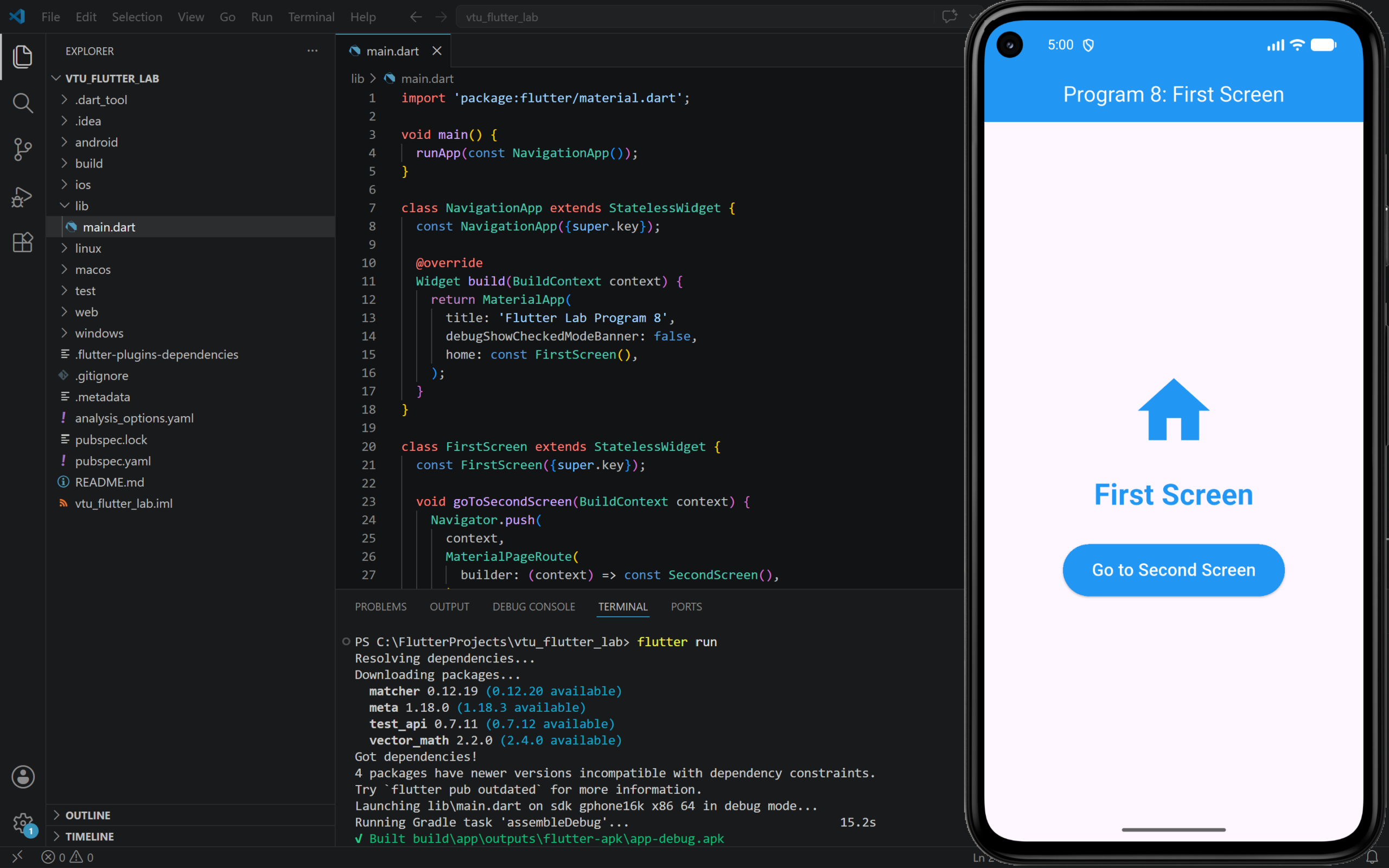
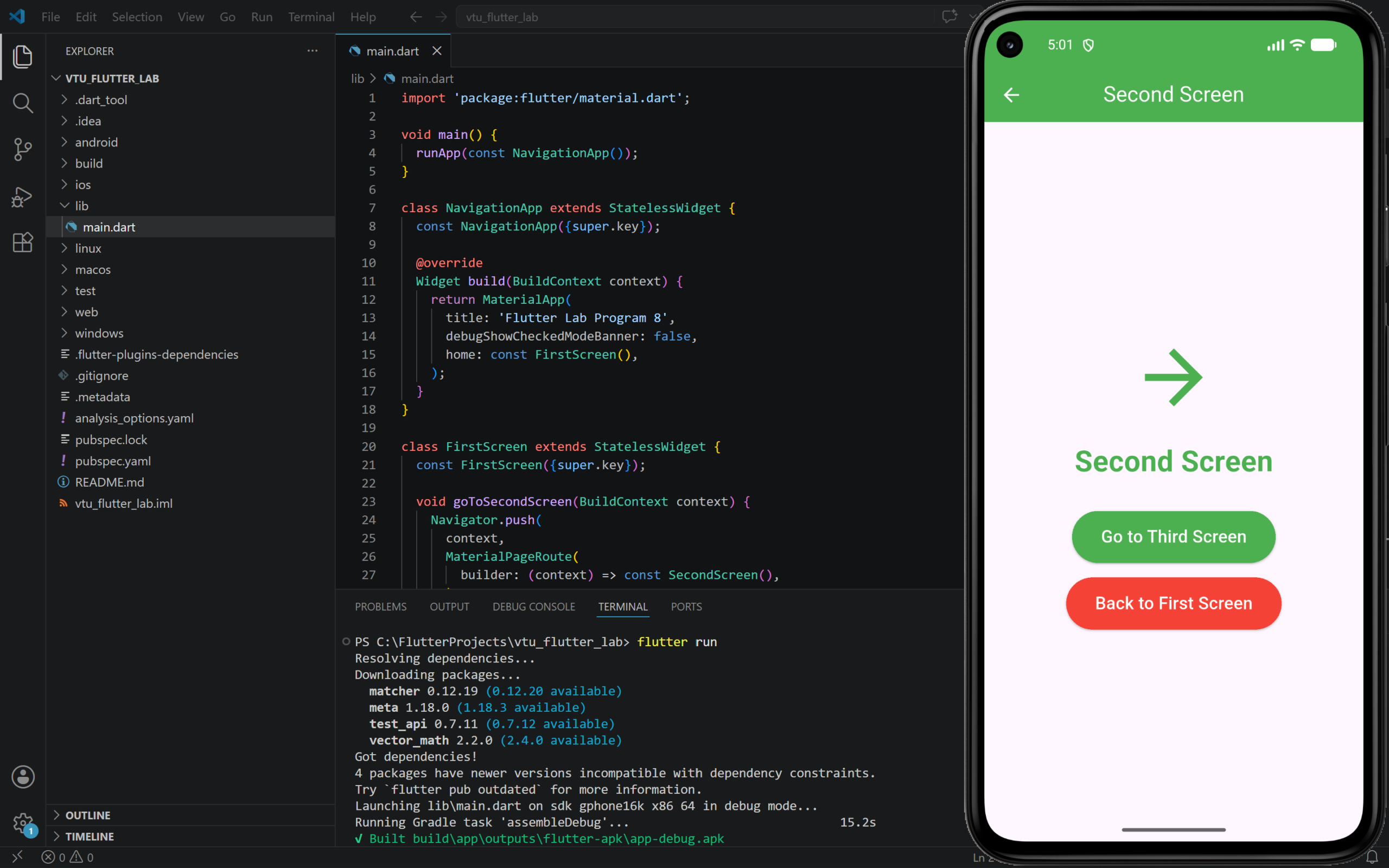
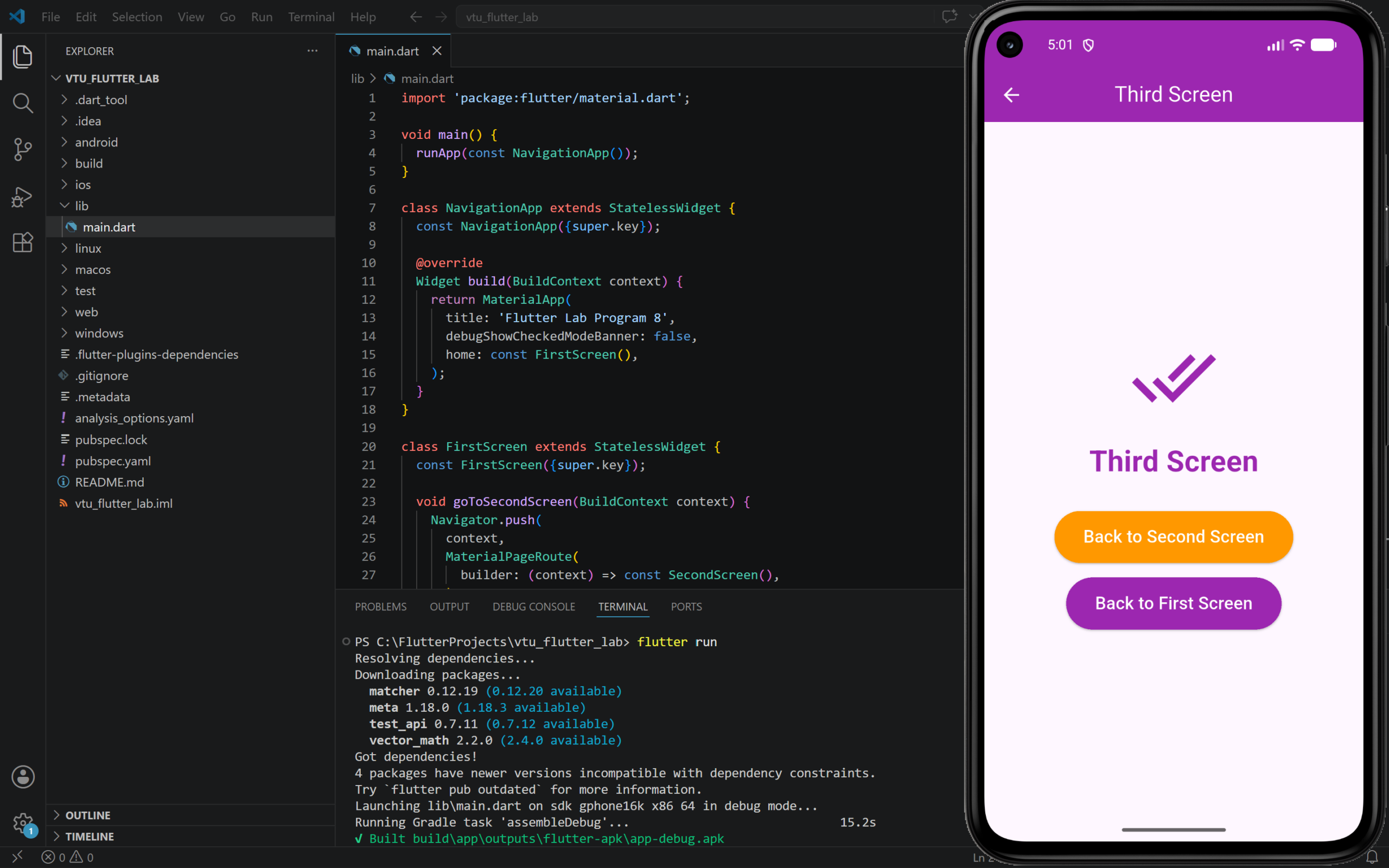
8. Develop an application that Navigate from one Screen to another (Seamless navigation).
Step to Run
- Open your Flutter project in VS Code.
- Open
lib/main.dart. - Delete the existing code.
- Paste the program code given below.
- Save the file.
- Run the program using
flutter runcmd
PROGRAM:
import 'package:flutter/material.dart';

void main() {
  runApp(const NavigationApp());
}

class NavigationApp extends StatelessWidget {
  const NavigationApp({super.key});

  @override
  Widget build(BuildContext context) {
    return MaterialApp(
      title: 'Flutter Lab Program 8',
      debugShowCheckedModeBanner: false,
      home: const FirstScreen(),
    );
  }
}

class FirstScreen extends StatelessWidget {
  const FirstScreen({super.key});

  void goToSecondScreen(BuildContext context) {
    Navigator.push(
      context,
      MaterialPageRoute(
        builder: (context) => const SecondScreen(),
      ),
    );
  }

  @override
  Widget build(BuildContext context) {
    return Scaffold(
      appBar: AppBar(
        title: const Text('Program 8: First Screen'),
        centerTitle: true,
        backgroundColor: Colors.blue,
        foregroundColor: Colors.white,
      ),
      body: Center(
        child: Column(
          mainAxisAlignment: MainAxisAlignment.center,
          children: [
            const Icon(
              Icons.home,
              size: 90,
              color: Colors.blue,
            ),
            const SizedBox(height: 20),
            const Text(
              'First Screen',
              style: TextStyle(
                fontSize: 30,
                fontWeight: FontWeight.bold,
                color: Colors.blue,
              ),
            ),
            const SizedBox(height: 30),
            ElevatedButton(
              onPressed: () {
                goToSecondScreen(context);
              },
              style: ElevatedButton.styleFrom(
                backgroundColor: Colors.blue,
                foregroundColor: Colors.white,
                padding: const EdgeInsets.symmetric(
                  horizontal: 30,
                  vertical: 14,
                ),
              ),
              child: const Text(
                'Go to Second Screen',
                style: TextStyle(fontSize: 18),
              ),
            ),
          ],
        ),
      ),
    );
  }
}

class SecondScreen extends StatelessWidget {
  const SecondScreen({super.key});

  void goToThirdScreen(BuildContext context) {
    Navigator.push(
      context,
      MaterialPageRoute(
        builder: (context) => const ThirdScreen(),
      ),
    );
  }

  void goBack(BuildContext context) {
    Navigator.pop(context);
  }

  @override
  Widget build(BuildContext context) {
    return Scaffold(
      appBar: AppBar(
        title: const Text('Second Screen'),
        centerTitle: true,
        backgroundColor: Colors.green,
        foregroundColor: Colors.white,
      ),
      body: Center(
        child: Column(
          mainAxisAlignment: MainAxisAlignment.center,
          children: [
            const Icon(
              Icons.arrow_forward,
              size: 90,
              color: Colors.green,
            ),
            const SizedBox(height: 20),
            const Text(
              'Second Screen',
              style: TextStyle(
                fontSize: 30,
                fontWeight: FontWeight.bold,
                color: Colors.green,
              ),
            ),
            const SizedBox(height: 30),
            ElevatedButton(
              onPressed: () {
                goToThirdScreen(context);
              },
              style: ElevatedButton.styleFrom(
                backgroundColor: Colors.green,
                foregroundColor: Colors.white,
                padding: const EdgeInsets.symmetric(
                  horizontal: 30,
                  vertical: 14,
                ),
              ),
              child: const Text(
                'Go to Third Screen',
                style: TextStyle(fontSize: 18),
              ),
            ),
            const SizedBox(height: 15),
            ElevatedButton(
              onPressed: () {
                goBack(context);
              },
              style: ElevatedButton.styleFrom(
                backgroundColor: Colors.red,
                foregroundColor: Colors.white,
                padding: const EdgeInsets.symmetric(
                  horizontal: 30,
                  vertical: 14,
                ),
              ),
              child: const Text(
                'Back to First Screen',
                style: TextStyle(fontSize: 18),
              ),
            ),
          ],
        ),
      ),
    );
  }
}

class ThirdScreen extends StatelessWidget {
  const ThirdScreen({super.key});

  void goBack(BuildContext context) {
    Navigator.pop(context);
  }

  void goToFirstScreen(BuildContext context) {
    Navigator.popUntil(context, (route) => route.isFirst);
  }

  @override
  Widget build(BuildContext context) {
    return Scaffold(
      appBar: AppBar(
        title: const Text('Third Screen'),
        centerTitle: true,
        backgroundColor: Colors.purple,
        foregroundColor: Colors.white,
      ),
      body: Center(
        child: Column(
          mainAxisAlignment: MainAxisAlignment.center,
          children: [
            const Icon(
              Icons.done_all,
              size: 90,
              color: Colors.purple,
            ),
            const SizedBox(height: 20),
            const Text(
              'Third Screen',
              style: TextStyle(
                fontSize: 30,
                fontWeight: FontWeight.bold,
                color: Colors.purple,
              ),
            ),
            const SizedBox(height: 30),
            ElevatedButton(
              onPressed: () {
                goBack(context);
              },
              style: ElevatedButton.styleFrom(
                backgroundColor: Colors.orange,
                foregroundColor: Colors.white,
                padding: const EdgeInsets.symmetric(
                  horizontal: 30,
                  vertical: 14,
                ),
              ),
              child: const Text(
                'Back to Second Screen',
                style: TextStyle(fontSize: 18),
              ),
            ),
            const SizedBox(height: 15),
            ElevatedButton(
              onPressed: () {
                goToFirstScreen(context);
              },
              style: ElevatedButton.styleFrom(
                backgroundColor: Colors.purple,
                foregroundColor: Colors.white,
                padding: const EdgeInsets.symmetric(
                  horizontal: 30,
                  vertical: 14,
                ),
              ),
              child: const Text(
                'Back to First Screen',
                style: TextStyle(fontSize: 18),
              ),
            ),
          ],
        ),
      ),
    );
  }
}OUTPUT: