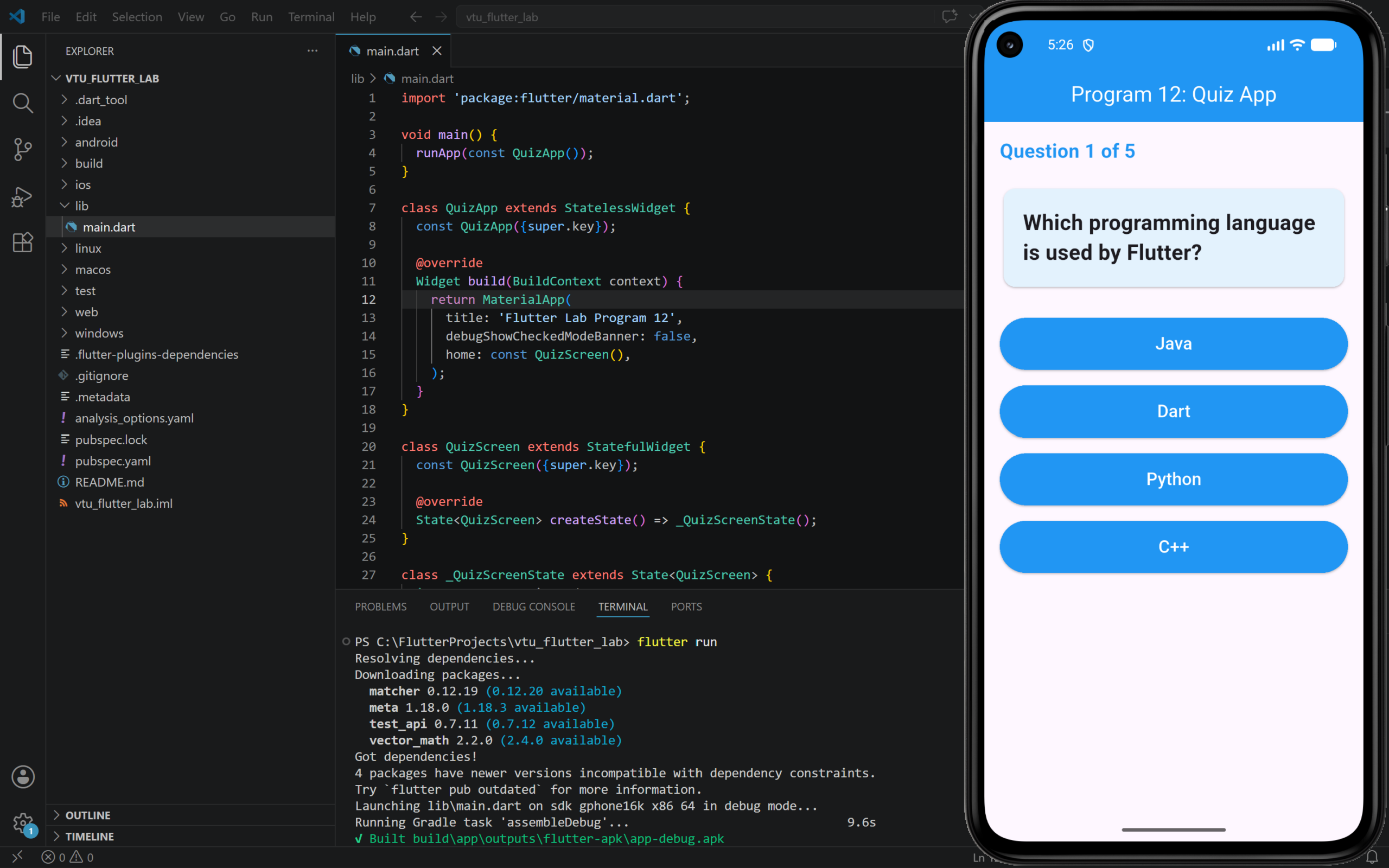
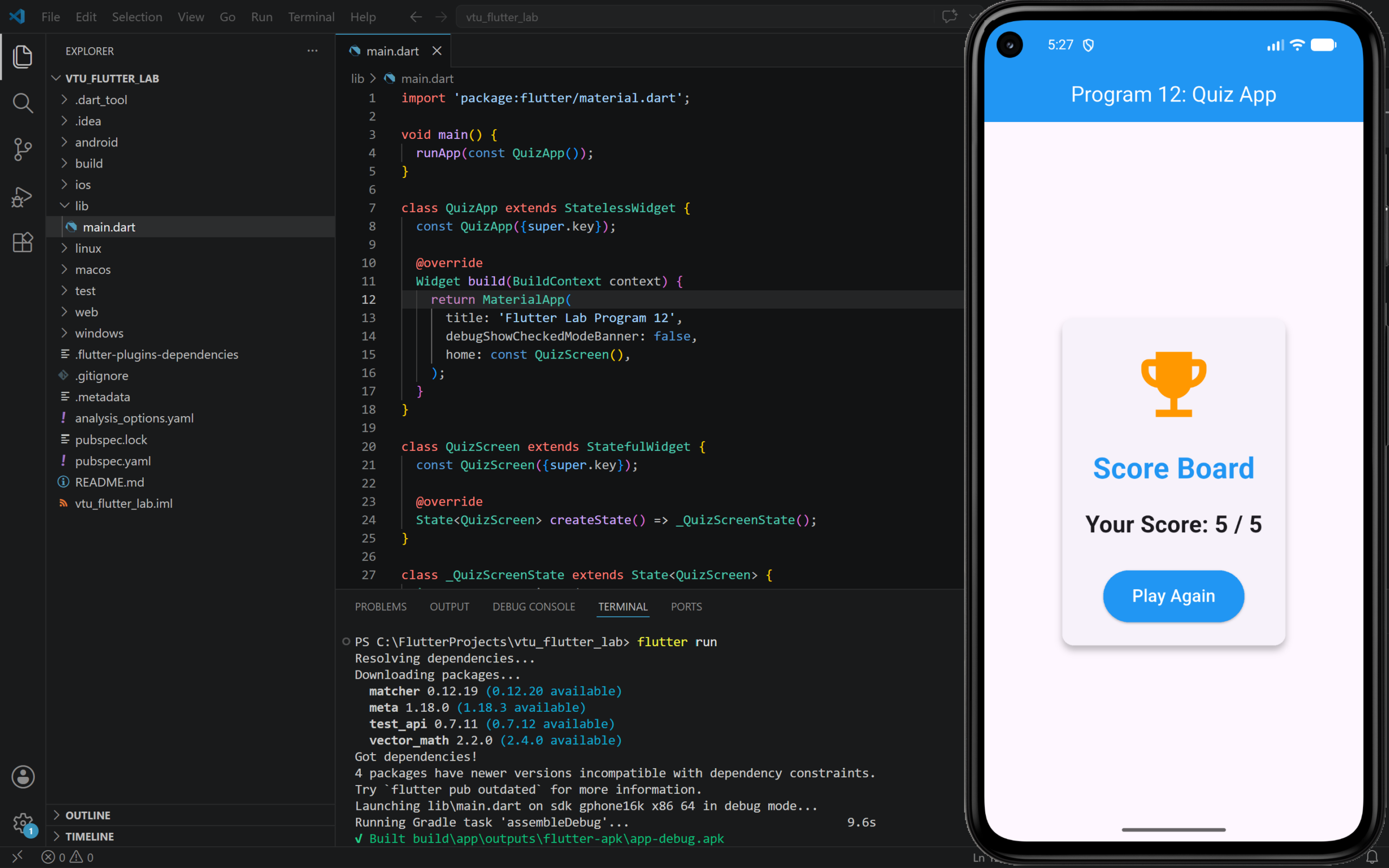
12. Develop an application to Play Quiz and get the Score Board.
Step to Run
- Open your Flutter project in VS Code.
- Open
lib/main.dart. - Delete the existing code.
- Paste the program code given below.
- Save the file.
- Run the program using
flutter runcmd
PROGRAM:
import 'package:flutter/material.dart';

void main() {
  runApp(const QuizApp());
}

class QuizApp extends StatelessWidget {
  const QuizApp({super.key});

  @override
  Widget build(BuildContext context) {
    return MaterialApp(
      title: 'Flutter Lab Program 12',
      debugShowCheckedModeBanner: false,
      home: const QuizScreen(),
    );
  }
}

class QuizScreen extends StatefulWidget {
  const QuizScreen({super.key});

  @override
  State<QuizScreen> createState() => _QuizScreenState();
}

class _QuizScreenState extends State<QuizScreen> {
  int currentQuestionIndex = 0;
  int score = 0;
  bool quizCompleted = false;

  final List<Map<String, dynamic>> questions = [
    {
      'question': 'Which programming language is used by Flutter?',
      'options': ['Java', 'Dart', 'Python', 'C++'],
      'answer': 'Dart',
    },
    {
      'question': 'Which widget is used to create a button in Flutter?',
      'options': ['Text', 'Column', 'ElevatedButton', 'Container'],
      'answer': 'ElevatedButton',
    },
    {
      'question': 'Which widget is used for layout in vertical direction?',
      'options': ['Row', 'Column', 'Stack', 'Card'],
      'answer': 'Column',
    },
    {
      'question': 'Which command is used to run a Flutter app?',
      'options': [
        'flutter start',
        'flutter run',
        'flutter open',
        'flutter build'
      ],
      'answer': 'flutter run',
    },
    {
      'question': 'Which widget is used to display text?',
      'options': ['Image', 'Text', 'Icon', 'AppBar'],
      'answer': 'Text',
    },
  ];

  void checkAnswer(String selectedAnswer) {
    if (selectedAnswer == questions[currentQuestionIndex]['answer']) {
      score++;
    }

    setState(() {
      if (currentQuestionIndex < questions.length - 1) {
        currentQuestionIndex++;
      } else {
        quizCompleted = true;
      }
    });
  }

  void restartQuiz() {
    setState(() {
      currentQuestionIndex = 0;
      score = 0;
      quizCompleted = false;
    });
  }

  @override
  Widget build(BuildContext context) {
    var currentQuestion = questions[currentQuestionIndex];

    return Scaffold(
      appBar: AppBar(
        title: const Text('Program 12: Quiz App'),
        centerTitle: true,
        backgroundColor: Colors.blue,
        foregroundColor: Colors.white,
      ),
      body: Padding(
        padding: const EdgeInsets.all(16),
        child: quizCompleted
            ? Center(
                child: Card(
                  elevation: 5,
                  child: Padding(
                    padding: const EdgeInsets.all(24),
                    child: Column(
                      mainAxisSize: MainAxisSize.min,
                      children: [
                        const Icon(
                          Icons.emoji_events,
                          size: 90,
                          color: Colors.orange,
                        ),
                        const SizedBox(height: 20),
                        const Text(
                          'Score Board',
                          style: TextStyle(
                            fontSize: 30,
                            fontWeight: FontWeight.bold,
                            color: Colors.blue,
                          ),
                        ),
                        const SizedBox(height: 20),
                        Text(
                          'Your Score: $score / ${questions.length}',
                          style: const TextStyle(
                            fontSize: 24,
                            fontWeight: FontWeight.bold,
                          ),
                        ),
                        const SizedBox(height: 30),
                        ElevatedButton(
                          onPressed: restartQuiz,
                          style: ElevatedButton.styleFrom(
                            backgroundColor: Colors.blue,
                            foregroundColor: Colors.white,
                            padding: const EdgeInsets.symmetric(
                              horizontal: 30,
                              vertical: 14,
                            ),
                          ),
                          child: const Text(
                            'Play Again',
                            style: TextStyle(fontSize: 18),
                          ),
                        ),
                      ],
                    ),
                  ),
                ),
              )
            : Column(
                crossAxisAlignment: CrossAxisAlignment.stretch,
                children: [
                  Text(
                    'Question ${currentQuestionIndex + 1} of ${questions.length}',
                    style: const TextStyle(
                      fontSize: 20,
                      fontWeight: FontWeight.bold,
                      color: Colors.blue,
                    ),
                  ),
                  const SizedBox(height: 20),
                  Card(
                    color: Colors.blue.shade50,
                    child: Padding(
                      padding: const EdgeInsets.all(20),
                      child: Text(
                        currentQuestion['question'],
                        style: const TextStyle(
                          fontSize: 22,
                          fontWeight: FontWeight.bold,
                        ),
                      ),
                    ),
                  ),
                  const SizedBox(height: 20),
                  ...currentQuestion['options'].map<Widget>((option) {
                    return Padding(
                      padding: const EdgeInsets.symmetric(vertical: 8),
                      child: ElevatedButton(
                        onPressed: () {
                          checkAnswer(option);
                        },
                        style: ElevatedButton.styleFrom(
                          backgroundColor: Colors.blue,
                          foregroundColor: Colors.white,
                          padding: const EdgeInsets.symmetric(vertical: 14),
                        ),
                        child: Text(
                          option,
                          style: const TextStyle(fontSize: 18),
                        ),
                      ),
                    );
                  }).toList(),
                ],
              ),
      ),
    );
  }
}OUTPUT: