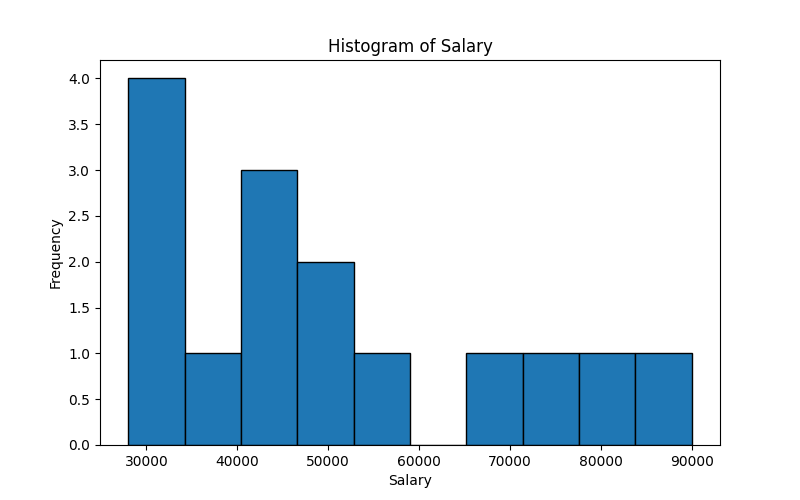
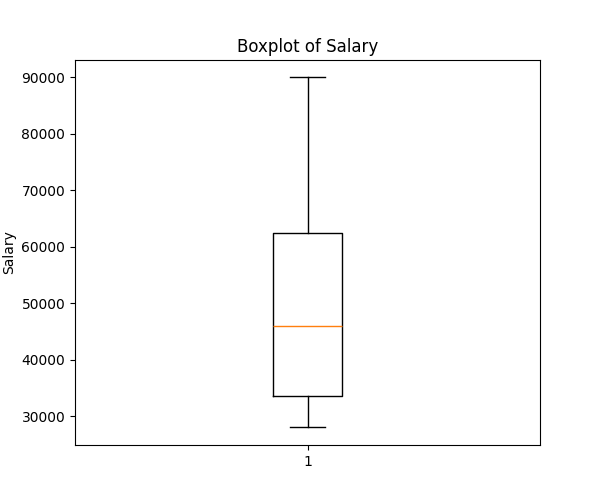
1. Develop a program to Load a dataset and select one numerical column. Compute mean, median, mode, standard deviation, variance, and range for a given numerical column in a dataset. Generate a histogram and boxplot to understand the distribution of the data. Identify any outliers in the data using IQR. Select a categorical variable from a dataset. Compute the frequency of each category and display it as a bar chart or pie chart.
PROGRAM: download dataset file click here
#install required libraries
#pip install pandas matplotlib

import pandas as pd
import matplotlib.pyplot as plt

# ==============================
# 1. Load Dataset
# ==============================
# Example: data.csv
df = pd.read_csv("data.csv")

print("Dataset Preview:")
print(df.head())

print("\nColumns in dataset:")
print(df.columns)

# ==============================
# 2. Select Numerical Column
# ==============================
num_col = input("\nEnter numerical column name: ")

data = df[num_col].dropna()

# ==============================
# 3. Statistical Measures
# ==============================
mean = data.mean()
median = data.median()
mode = data.mode()[0]
std_dev = data.std()
variance = data.var()
data_range = data.max() - data.min()

print("\n--- Statistical Summary ---")
print("Mean:", mean)
print("Median:", median)
print("Mode:", mode)
print("Standard Deviation:", std_dev)
print("Variance:", variance)
print("Range:", data_range)

# ==============================
# 4. Histogram
# ==============================
plt.figure(figsize=(8, 5))
plt.hist(data, bins=10, edgecolor="black")
plt.title(f"Histogram of {num_col}")
plt.xlabel(num_col)
plt.ylabel("Frequency")
plt.show()

# ==============================
# 5. Boxplot
# ==============================
plt.figure(figsize=(6, 5))
plt.boxplot(data)
plt.title(f"Boxplot of {num_col}")
plt.ylabel(num_col)
plt.show()

# ==============================
# 6. Outlier Detection using IQR
# ==============================
Q1 = data.quantile(0.25)
Q3 = data.quantile(0.75)
IQR = Q3 - Q1

lower_bound = Q1 - 1.5 * IQR
upper_bound = Q3 + 1.5 * IQR

outliers = data[(data < lower_bound) | (data > upper_bound)]

print("\n--- Outlier Detection using IQR ---")
print("Q1:", Q1)
print("Q3:", Q3)
print("IQR:", IQR)
print("Lower Bound:", lower_bound)
print("Upper Bound:", upper_bound)
print("Outliers:")
print(outliers)

# ==============================
# 7. Select Categorical Column
# ==============================
cat_col = input("\nEnter categorical column name: ")

category_freq = df[cat_col].value_counts()

print("\n--- Category Frequency ---")
print(category_freq)

# ==============================
# 8. Bar Chart
# ==============================
plt.figure(figsize=(8, 5))
category_freq.plot(kind="bar", edgecolor="black")
plt.title(f"Frequency of {cat_col}")
plt.xlabel(cat_col)
plt.ylabel("Count")
plt.xticks(rotation=45)
plt.show()

# ==============================
# 9. Pie Chart
# ==============================
plt.figure(figsize=(7, 7))
category_freq.plot(kind="pie", autopct="%1.1f%%")
plt.title(f"Pie Chart of {cat_col}")
plt.ylabel("")
plt.show()OUTPUT:
Dataset Preview:
    Name  Age  Salary  Department  Experience
0   Amit   25   30000          IT           2
1   Riya   28   35000          HR           3
2  Rahul   35   50000     Finance           8
3  Sneha   30   45000          IT           5
4  Arjun   40   70000  Management          12

Columns in dataset:
Index(['Name', 'Age', 'Salary', 'Department', 'Experience'], dtype='str')

Enter numerical column name: Salary

--- Statistical Summary ---
Mean: 50200.0
Median: 46000.0
Mode: 28000
Standard Deviation: 19508.972294818606
Variance: 380600000.0
Range: 62000