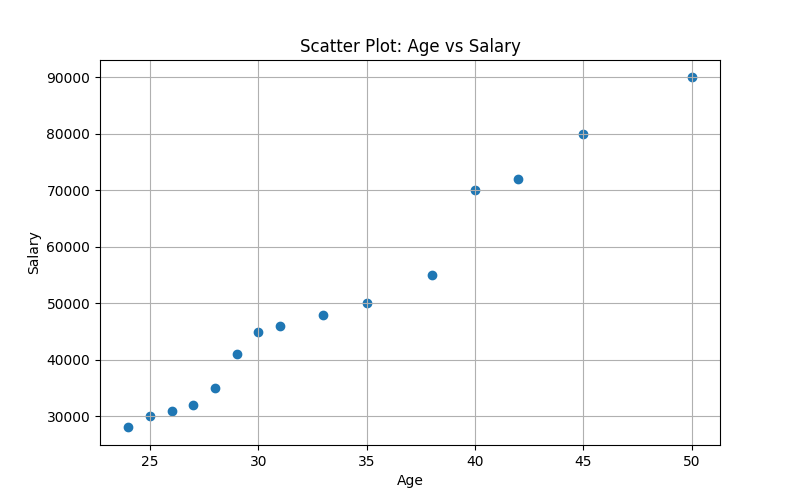
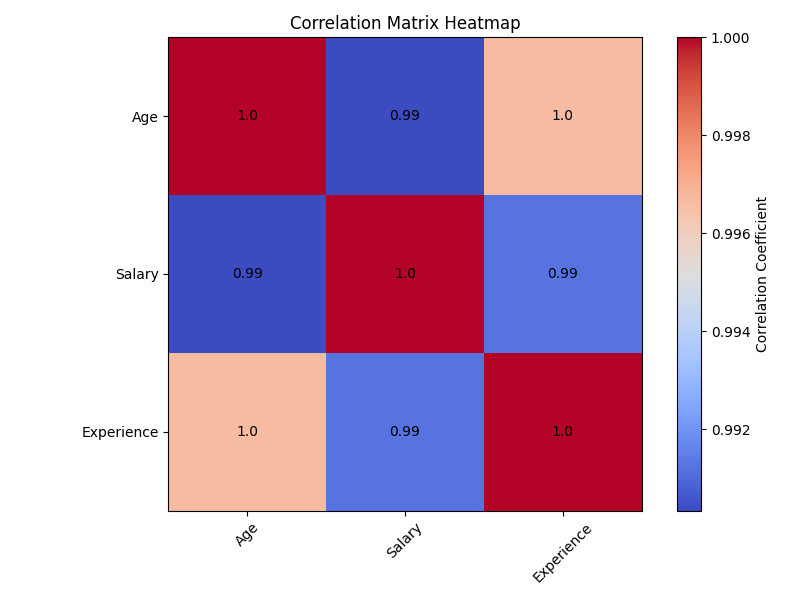
2. Develop a program to Load a dataset with at least two numerical columns (e.g., Iris, Titanic). Plot a scatter plot of two variables and calculate their Pearson correlation coefficient. Write a program to compute the covariance and correlation matrix for a dataset. Visualize the correlation matrix using a heatmap to know which variables have strong positive/negative correlations.
PROGRAM: download dataset file click here
#install required packages
#pip install pandas matplotlib

import pandas as pd
import matplotlib.pyplot as plt

# ==============================
# 1. Load Dataset
# ==============================
df = pd.read_csv("data.csv")

print("Dataset Preview:")
print(df.head())

print("\nColumns in dataset:")
print(df.columns)

# ==============================
# 2. Select Numerical Columns
# ==============================
num_col1 = input("\nEnter first numerical column name: ")
num_col2 = input("Enter second numerical column name: ")

x = df[num_col1]
y = df[num_col2]

# ==============================
# 3. Scatter Plot
# ==============================
plt.figure(figsize=(8, 5))
plt.scatter(x, y)
plt.title(f"Scatter Plot: {num_col1} vs {num_col2}")
plt.xlabel(num_col1)
plt.ylabel(num_col2)
plt.grid(True)
plt.show()

# ==============================
# 4. Pearson Correlation Coefficient
# ==============================
pearson_corr = x.corr(y)

print("\n--- Pearson Correlation Coefficient ---")
print(f"Correlation between {num_col1} and {num_col2}: {pearson_corr}")

# ==============================
# 5. Covariance Matrix
# ==============================
numeric_df = df.select_dtypes(include=["number"])

cov_matrix = numeric_df.cov()

print("\n--- Covariance Matrix ---")
print(cov_matrix)

# ==============================
# 6. Correlation Matrix
# ==============================
corr_matrix = numeric_df.corr()

print("\n--- Correlation Matrix ---")
print(corr_matrix)

# ==============================
# 7. Heatmap of Correlation Matrix
# ==============================
plt.figure(figsize=(8, 6))
plt.imshow(corr_matrix, cmap="coolwarm", interpolation="nearest")
plt.colorbar(label="Correlation Coefficient")

plt.xticks(range(len(corr_matrix.columns)), corr_matrix.columns, rotation=45)
plt.yticks(range(len(corr_matrix.columns)), corr_matrix.columns)

plt.title("Correlation Matrix Heatmap")

# Show values inside heatmap
for i in range(len(corr_matrix.columns)):
    for j in range(len(corr_matrix.columns)):
        plt.text(j, i, round(corr_matrix.iloc[i, j], 2),
                 ha="center", va="center")

plt.tight_layout()
plt.show()OUTPUT:
Dataset Preview:
    Name  Age  Salary  Department  Experience
0   Amit   25   30000          IT           2
1   Riya   28   35000          HR           3
2  Rahul   35   50000     Finance           8
3  Sneha   30   45000          IT           5
4  Arjun   40   70000  Management          12

Columns in dataset:
Index(['Name', 'Age', 'Salary', 'Department', 'Experience'], dtype='str')

Enter first numerical column name: Age
Enter second numerical column name: Salary

--- Pearson Correlation Coefficient ---
Correlation between Age and Salary: 0.9903428626629642

--- Covariance Matrix ---
                      Age        Salary     Experience
Age             62.266667  1.524571e+05      44.376190
Salary      152457.142857  3.806000e+08  109114.285714
Experience      44.376190  1.091143e+05      31.838095

--- Correlation Matrix ---
                 Age    Salary  Experience
Age         1.000000  0.990343    0.996664
Salary      0.990343  1.000000    0.991228
Experience  0.996664  0.991228    1.000000