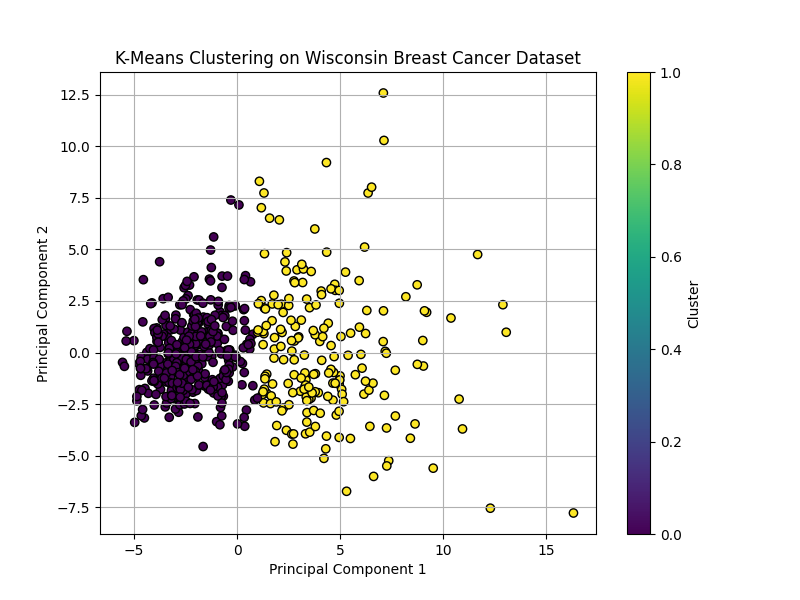
9. Develop a program to implement k-means clustering using Wisconsin Breast Cancer data set and visualize the clustering result.
PROGRAM:
# install required packages
#pip install pandas matplotlib scikit-learn

import pandas as pd
import matplotlib.pyplot as plt

from sklearn.datasets import load_breast_cancer
from sklearn.preprocessing import StandardScaler
from sklearn.cluster import KMeans
from sklearn.decomposition import PCA
from sklearn.metrics import confusion_matrix, accuracy_score


# ==============================
# 1. Load Dataset
# ==============================
cancer = load_breast_cancer()

X = cancer.data
y = cancer.target

df = pd.DataFrame(X, columns=cancer.feature_names)

print("Dataset Preview:")
print(df.head())

print("\nTarget Names:")
print(cancer.target_names)

# ==============================
# 2. Standardize Features
# ==============================
scaler = StandardScaler()
X_scaled = scaler.fit_transform(X)

# ==============================
# 3. Apply K-Means Clustering
# ==============================
kmeans = KMeans(n_clusters=2, random_state=42, n_init=10)
clusters = kmeans.fit_predict(X_scaled)

# ==============================
# 4. Reduce Dimensions using PCA for Visualization
# ==============================
pca = PCA(n_components=2)
X_pca = pca.fit_transform(X_scaled)

pca_df = pd.DataFrame(X_pca, columns=["PC1", "PC2"])
pca_df["Cluster"] = clusters
pca_df["Actual"] = y

print("\nCluster Results:")
print(pca_df.head())

# ==============================
# 5. Visualize K-Means Clustering Result
# ==============================
plt.figure(figsize=(8, 6))

plt.scatter(
    pca_df["PC1"],
    pca_df["PC2"],
    c=pca_df["Cluster"],
    cmap="viridis",
    edgecolor="black"
)

plt.xlabel("Principal Component 1")
plt.ylabel("Principal Component 2")
plt.title("K-Means Clustering on Wisconsin Breast Cancer Dataset")
plt.colorbar(label="Cluster")
plt.grid(True)
plt.show()

# ==============================
# 6. Compare with Actual Classes
# ==============================
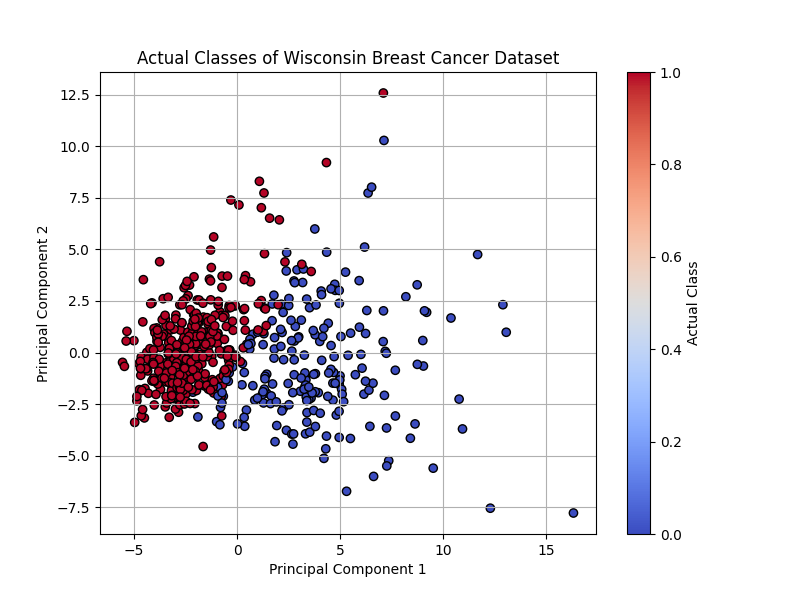
plt.figure(figsize=(8, 6))

plt.scatter(
    pca_df["PC1"],
    pca_df["PC2"],
    c=pca_df["Actual"],
    cmap="coolwarm",
    edgecolor="black"
)

plt.xlabel("Principal Component 1")
plt.ylabel("Principal Component 2")
plt.title("Actual Classes of Wisconsin Breast Cancer Dataset")
plt.colorbar(label="Actual Class")
plt.grid(True)
plt.show()

# ==============================
# 7. Optional Evaluation
# ==============================
print("\nConfusion Matrix:")
print(confusion_matrix(y, clusters))

# Since cluster labels may be reversed, calculate both accuracies
accuracy1 = accuracy_score(y, clusters)
accuracy2 = accuracy_score(y, 1 - clusters)

print("\nK-Means Clustering Accuracy:")
print(max(accuracy1, accuracy2))OUTPUT:
Dataset Preview:
   mean radius  mean texture  mean perimeter  mean area  ...  worst concavity  worst concave points  worst symmetry  worst fractal dimension
0        17.99         10.38          122.80     1001.0  ...           0.7119                0.2654          0.4601                  0.11890
1        20.57         17.77          132.90     1326.0  ...           0.2416                0.1860          0.2750                  0.08902
2        19.69         21.25          130.00     1203.0  ...           0.4504                0.2430          0.3613                  0.08758
3        11.42         20.38           77.58      386.1  ...           0.6869                0.2575          0.6638                  0.17300
4        20.29         14.34          135.10     1297.0  ...           0.4000                0.1625          0.2364                  0.07678

[5 rows x 30 columns]

Target Names:
['malignant' 'benign']

Cluster Results:
        PC1        PC2  Cluster  Actual
0  9.192837   1.948583        1       0
1  2.387802  -3.768172        1       0
2  5.733896  -1.075174        1       0
3  7.122953  10.275589        1       0
4  3.935302  -1.948072        1       0

Confusion Matrix:
[[ 36 176]
 [339  18]]

K-Means Clustering Accuracy:
0.9050966608084359