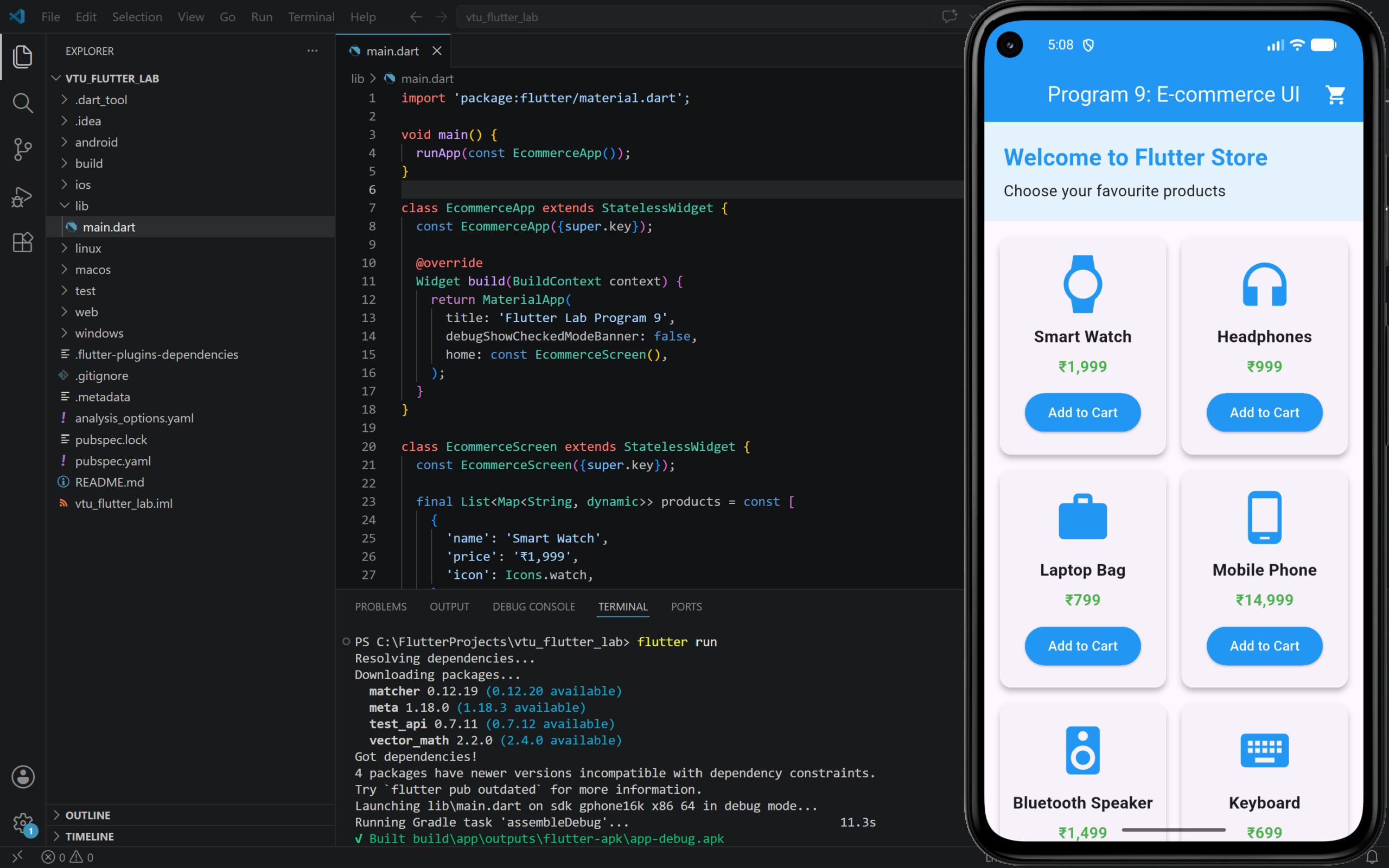
9. Develop Basic E-commerce UI Application.
Step to Run
- Open your Flutter project in VS Code.
- Open
lib/main.dart. - Delete the existing code.
- Paste the program code given below.
- Save the file.
- Run the program using
flutter runcmd
PROGRAM:
import 'package:flutter/material.dart';

void main() {
  runApp(const EcommerceApp());
}

class EcommerceApp extends StatelessWidget {
  const EcommerceApp({super.key});

  @override
  Widget build(BuildContext context) {
    return MaterialApp(
      title: 'Flutter Lab Program 9',
      debugShowCheckedModeBanner: false,
      home: const EcommerceScreen(),
    );
  }
}

class EcommerceScreen extends StatelessWidget {
  const EcommerceScreen({super.key});

  final List<Map<String, dynamic>> products = const [
    {
      'name': 'Smart Watch',
      'price': '₹1,999',
      'icon': Icons.watch,
    },
    {
      'name': 'Headphones',
      'price': '₹999',
      'icon': Icons.headphones,
    },
    {
      'name': 'Laptop Bag',
      'price': '₹799',
      'icon': Icons.work,
    },
    {
      'name': 'Mobile Phone',
      'price': '₹14,999',
      'icon': Icons.phone_android,
    },
    {
      'name': 'Bluetooth Speaker',
      'price': '₹1,499',
      'icon': Icons.speaker,
    },
    {
      'name': 'Keyboard',
      'price': '₹699',
      'icon': Icons.keyboard,
    },
  ];

  void showCartMessage(BuildContext context, String productName) {
    ScaffoldMessenger.of(context).showSnackBar(
      SnackBar(
        content: Text('$productName added to cart'),
        duration: const Duration(seconds: 2),
      ),
    );
  }

  Widget productCard(BuildContext context, Map<String, dynamic> product) {
    return Card(
      elevation: 4,
      margin: const EdgeInsets.all(8),
      child: Padding(
        padding: const EdgeInsets.all(12),
        child: Column(
          mainAxisAlignment: MainAxisAlignment.center,
          children: [
            Icon(
              product['icon'],
              size: 60,
              color: Colors.blue,
            ),
            const SizedBox(height: 12),
            Text(
              product['name'],
              textAlign: TextAlign.center,
              style: const TextStyle(
                fontSize: 17,
                fontWeight: FontWeight.bold,
              ),
            ),
            const SizedBox(height: 8),
            Text(
              product['price'],
              style: const TextStyle(
                fontSize: 16,
                color: Colors.green,
                fontWeight: FontWeight.bold,
              ),
            ),
            const SizedBox(height: 12),
            ElevatedButton(
              onPressed: () {
                showCartMessage(context, product['name']);
              },
              style: ElevatedButton.styleFrom(
                backgroundColor: Colors.blue,
                foregroundColor: Colors.white,
              ),
              child: const Text('Add to Cart'),
            ),
          ],
        ),
      ),
    );
  }

  @override
  Widget build(BuildContext context) {
    return Scaffold(
      appBar: AppBar(
        title: const Text('Program 9: E-commerce UI'),
        centerTitle: true,
        backgroundColor: Colors.blue,
        foregroundColor: Colors.white,
        actions: const [
          Padding(
            padding: EdgeInsets.only(right: 16),
            child: Icon(Icons.shopping_cart),
          ),
        ],
      ),
      body: Column(
        children: [
          Container(
            width: double.infinity,
            padding: const EdgeInsets.all(20),
            color: Colors.blue.shade50,
            child: const Column(
              crossAxisAlignment: CrossAxisAlignment.start,
              children: [
                Text(
                  'Welcome to Flutter Store',
                  style: TextStyle(
                    fontSize: 24,
                    fontWeight: FontWeight.bold,
                    color: Colors.blue,
                  ),
                ),
                SizedBox(height: 6),
                Text(
                  'Choose your favourite products',
                  style: TextStyle(fontSize: 16),
                ),
              ],
            ),
          ),
          Expanded(
            child: GridView.builder(
              padding: const EdgeInsets.all(8),
              itemCount: products.length,
              gridDelegate: const SliverGridDelegateWithFixedCrossAxisCount(
                crossAxisCount: 2,
                childAspectRatio: 0.78,
              ),
              itemBuilder: (context, index) {
                return productCard(context, products[index]);
              },
            ),
          ),
        ],
      ),
    );
  }
}OUTPUT: